Strategy marketplace
The marketplace lists public strategies by source, market, condition, owner, and subscription state.
| Type | Scope | Conditions |
|---|---|---|
| Market | Included or excluded symbols and supported venues | Dynamic market metrics, a 1–30 minute window, comparison operator, threshold, and optional cooldown |
| News | Sources labeled Engine - News type, related coins, and excluded coins | News Score, Contains, and Excludes conditions over the title and body |
| Wallet | Mixed Hyperliquid addresses and Binance Copy Trading lead IDs or URLs, with per-row platform, remark, and notification settings | Supported wallet metrics and thresholds |
| Monitor groups or platform-monitored accounts, including accounts outside your followed list | Event types and optional comma-separated text keywords |
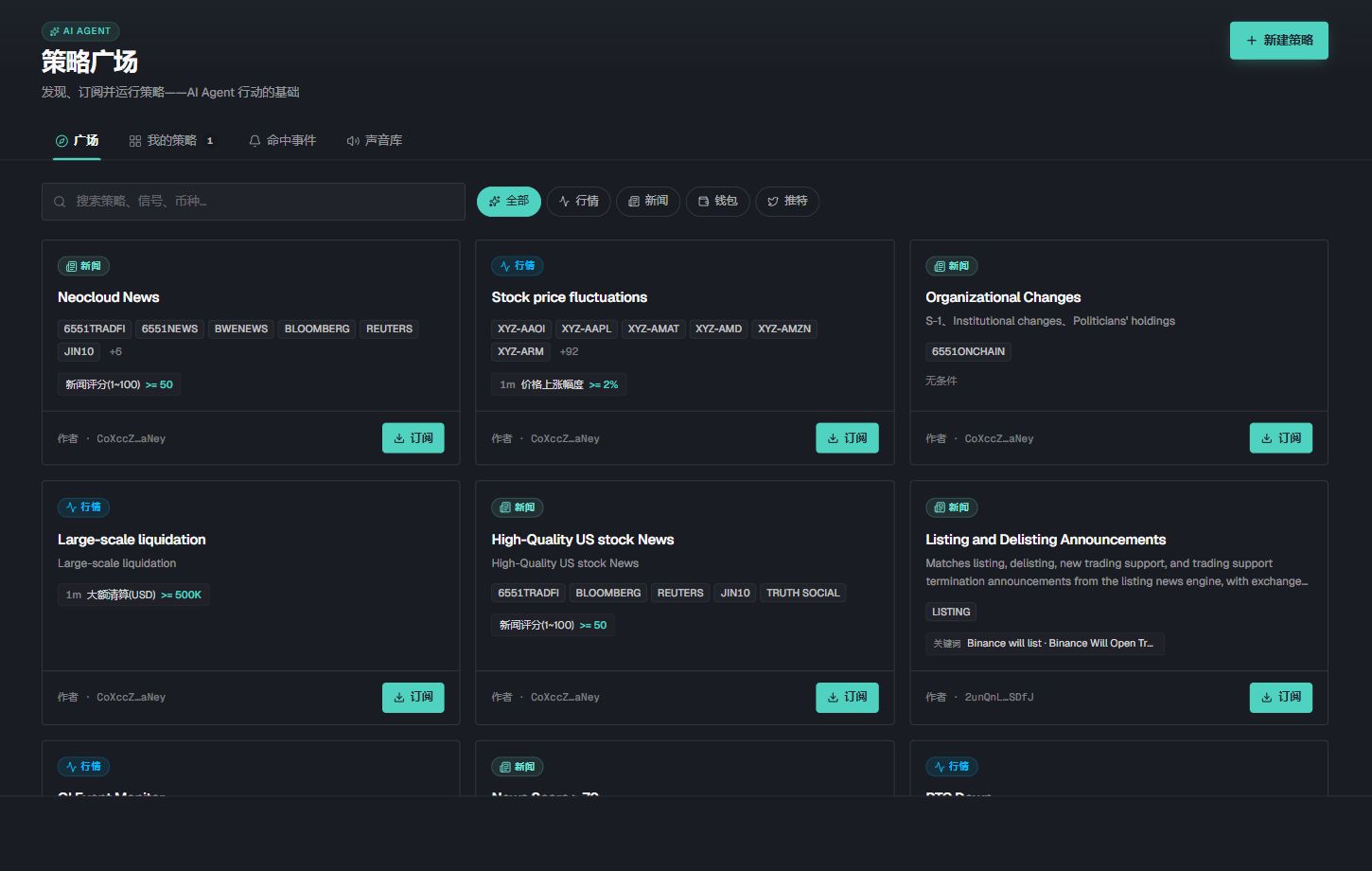
Visible cards, filters, and subscription states belong to the captured catalog and account. Read the current card source, conditions, and status.
Subscribe to a public strategy
- 01
Open a strategy card
Read its source, markets, conditions, interval, and recent events.
- 02
Select Subscribe
Confirm that the card changes to a subscribed state.
- 03
Check event delivery
Open hit events or add the strategy to Event Panels.
Create a strategy
- 01
Name it and choose a type
Select Market, News, Wallet, or Twitter, then set Private or Public and the enabled state.
- 02
Set the scope
Choose the intended symbols, sources, addresses, lead IDs, or monitored accounts. Empty scope fields mean no restriction where the form says so.
- 03
Build condition groups
Add one or more conditions to a group, then add another group only when it should be an alternative trigger.
- 04
Set the alert
Choose a sound and marker color. Market strategies can also use a cooldown.
- 05
Save and verify
Open My strategies, check the summary and enabled state, then use Hit events to verify real matches.
Wallet and Twitter scope
For a Wallet strategy, choose a platform for each new row, enter its wallet address or Binance Copy Trading lead ID or detail-page URL, and add a remark. Each row has its own type, identifier, remark, and notification switch, so one strategy can contain targets from different platforms.
Check every row before saving: Hyperliquid uses a wallet address and Binance Copy Trading uses a lead ID. Monitoring a lead trader is separate from connecting your own Binance trading account.
For a Twitter strategy, switch between Selected, Find accounts, Hot recommend, and Group monitoring. Choose platform-monitored accounts, including accounts outside your own followed list, or your existing monitor groups. Return to Selected to review and remove entries, then configure event types and keywords.
Manage group membership in Twitter monitoring. If search returns nothing, check the username and monitoring status. Verify actual coverage in hit events after saving.
Create a strategy with Agent
Choose Create a monitoring strategy under Charts & strategies in Agent OS, or describe the trigger in a conversation. For example: “Alert me when BTC open interest rises more than 5% in 15 minutes. Show a draft first.”
If a metric is unavailable, refresh and review the draft again. Check the metric name, interval, and unit before confirming.
- 01
Describe the trigger
Specify the strategy type, venue, market, time window, metric, and threshold. News strategies can also use sources, keywords, ratings, and exclusions.
- 02
Review the draft
Check the name, scope, condition groups, enabled state, visibility, and notifications. Ask the Agent to adjust the draft when needed.
- 03
Confirm strategy
The draft is saved only after you select Confirm strategy. Open My strategies to verify it and review Hit events. Creating a monitoring strategy produces signals without placing orders.
Condition logic
Every condition in one group must match. Any condition group can trigger the strategy.
In a News group, a Contains field matches when any comma-separated keyword appears in the title or body. Excludes rejects content containing any listed excluded keyword. Matching is case-insensitive; use English terms when the original source is English.
Excluded coins apply to the complete event. If any related coin is in the excluded list, that event does not trigger the strategy.
For Binance Copy Trading wallet strategies, the product notes that signals normally arrive one to two minutes late because Binance limits off-platform real-time copy trading.
Hit events
Both docked and separate strategy-event panels support keyword search. Select the current pair in the panel header to query that market. Searching changes this view without editing saved strategy conditions. Disabled strategies appear later in My strategies; check the enabled state when looking for an entry.
Confirm the event time and data source.
Open the underlying news item, market, wallet transaction, or post.
Compare the event with the strategy condition.
Check cooldown and enabled state when expected events are missing.
Open in Event Panels
Select the strategy in Event Panels, then choose the main window or a separate window. Confirm the panel title and stream before using it as Agent context.