Pro
29USDT / month
Get Pro10,000 PTSper month
- Basic API access
- Twitter data queries
- News data queries
- AI news summaries
- Fuller Twitter messages
- Fewer rate limits
- Web Twitter monitoring: 200 custom accounts
- Twitter alerts across devices
Max
WSS99USDT / month
Get Max100,000 PTSper month
- Basic API access
- Twitter data queries
- News data queries
- AI news summaries
- Fuller Twitter messages
- Fewer rate limits
- Twitter monitoring: 600 custom accounts
- Twitter alerts across devices
- Real-time news and Twitter WSS feeds
- Access to the high-speed news trading terminal
Equivalent market value
- Comparable news trading terminal
- ~$2,500/mo
- High-speed news feed
- ~$10,000/mo
- Official Twitter live feed
- $42,000/mo
Total value$54,500/mo
551× value · 99.8% savings
Capability comparison; your subscription price is shown above.
Enterprise
- Unlimited or custom message quota
- Dedicated account manager and priority SLA
- Private deployment and an isolated API key pool
Basic query messages use 1 PTS per 20 messages. News and Twitter WSS use 1 PTS per 5 unique messages; duplicates across strategies are free. Pro and Max offer annual billing. Prices and benefits are confirmed at checkout.
Subscribe
- 01
Open NewsLiquid
Sign in to the MCP page and select Upgrade Plan.
- 02
Choose a plan and pay
Choose a plan and monthly or annual billing, review the amount, and complete checkout. News and Twitter WSS require Max.
- 03
Confirm activation
Check membership status and available PTS on the MCP page. Then set up the terminal, install Skills, or connect to WSS.
Check current usage
The MCP page shows Available messages, Total Points, and Used. The allowance summary separates recurring plan PTS from purchased PTS.
| Field | Meaning |
|---|---|
| Available messages | Basic news or tweet messages estimated from currently available PTS |
| Total Points | Current recurring allowance plus available purchased PTS |
| Used | Charges recorded in the current membership period |
How PTS is calculated
The basic conversion shown by the product is 1 Point = 20 messages for news and tweet message capacity. AI, WebSearch, monitoring, live WSS, company data, row-based tools, and other specialized calls use their own rules.
News and Twitter WSS share the same rate: 1 PTS per 5 unique messages. Duplicate pushes of the same news item or tweet across strategies incur no additional charge; the item is counted once. WSS uses this separate billing rule.
| Messages delivered | Charge | Rule |
|---|---|---|
| News WSS pushes 5 unique news items | 1 PTS | Billed by the number of unique messages |
| Twitter WSS pushes 10 unique tweets | 2 PTS | 10 ÷ 5 = 2 PTS |
| The same 5 news items are each pushed by 3 strategies | 1 PTS total | Duplicate pushes across strategies add no charge; 5 messages are counted |
| A standard news search returns 20 results | 1 PTS | The news-search rule applies, not the WSS rule |
| PTS type | Product label | Reset or expiry | Use |
|---|---|---|---|
| Free daily PTS | Free, refreshes daily | Resets each day | Basic queries and tools with their own published charge |
| Membership PTS | Current plan with reset and expiry dates | Resets by monthly or annual period | Calls made during the plan period |
| Purchased PTS | Purchased PTS, permanent | Does not reset with membership | Calls to tools already available at the account’s membership level |
PTS charge rules
A dash in Applicable plan means the tool is available to accounts at every membership level. Max means only Max-plan accounts can use the tool. Buying one-time PTS adds spendable balance but does not unlock Max tools.
| Tool | Applicable plan | Charge |
|---|---|---|
| Twitter articles | — | 1 PTS per request |
| News search | — | 1 PTS per 20 results; a partial group is billed as 20 |
| Get Twitter user details | — | 1 PTS per request |
| Get Twitter user by ID | — | 1 PTS per request |
| Get user tweets | — | 1 PTS per 20 results; a partial group is billed as 20 |
| Search tweets | — | 1 PTS per 20 results; a partial group is billed as 20 |
| Follow and unfollow data | — | 1 PTS per request |
| Deleted tweet data | — | 1 PTS per request |
| Twitter tweet | — | 1 PTS per request |
| WebSearch | — | 10 PTS per request |
| Get users who retweeted | — | 1 PTS per request |
| Influencer follow data | — | 1 PTS per request |
| Get quoted tweets | — | 1 PTS per 20 results; a partial group is billed as 20 |
| News categories | — | 0 PTS |
| NewsLiquid AI chat | — | 5 PTS per chat |
| Tool | Applicable plan | Charge |
|---|---|---|
| Remove Twitter monitor | Max | 0 PTS |
| News live data | Max | 1 PTS per 5 unique messages; duplicate pushes of the same news item across strategies incur no additional charge |
| Add Twitter monitor | Max | 10 PTS per request |
| Company profile | Max | 10 PTS per request plus 5 PTS per 1,000 characters |
| Full company report | Max | 100 PTS per request plus 20 PTS per 1,000 characters |
| Twitter live data | Max | 1 PTS per 5 unique messages; duplicate pushes of the same tweet across strategies incur no additional charge |
| Twitter monitor list | Max | 0 PTS |
| Institutional on-chain position changes | Max | 30 PTS plus 2 PTS per 10 rows |
| Key market events | Max | 10 PTS plus 2 PTS per 20 events |
| Company search | Max | 3 PTS per request |
| Institutional on-chain holdings | Max | 10 PTS plus 1 PTS per 10 rows |
| U.S. politician stock trade disclosures | Max | 5 PTS per request |
| Strategy list | Max | 1 quota unit per call |
| Strategy hit data | Max | 1 quota unit per call |
| 13F manager directory | Max | 3 quota units per call |
| Institutional equity holdings disclosure | Max | 5 quota units per call |
Upgrade or buy PTS
- 01
Check access first
Upgrade to Max when the target tool is Max-only. Buy permanent PTS only when the current plan already provides access and the balance is insufficient.
- 02
Open Upgrade plan or Buy PTS
Verify the membership level, amount, PTS, message estimate, and billing period.
- 03
Complete payment yourself
Check currency, network, amount, and recipient information before approving.
- 04
Verify the balance
Refresh the allowance summary and confirm the membership or purchased PTS and billing record.
| Payment | PTS | Basic message estimate | Displayed offer |
|---|---|---|---|
| 2 USDT | 800 PTS | About 16,000 | — |
| 5 USDT | 2,100 PTS | About 42,000 | Save 5% |
| 10 USDT | 4,500 PTS | About 90,000 | Save 11% |
| 50 USDT | 24,000 PTS | About 480,000 | Save 17%; Most popular |
| 100 USDT | 50,000 PTS | About 1,000,000 | Save 20%; Recommended |
| Custom amount | Calculated before payment | Calculated before payment | Minimum 100 USD |
| Need | Current behavior |
|---|---|
| Renew the current membership | The renewed period starts after the current period ends |
| Use more capacity now | Buy permanent PTS; the balance appears with the current allowance and applies only to tools already available at the current membership level |
| Enterprise | Provide email or Telegram. Company, Twitter monitor count, business scope, and notes are optional; the page states a typical reply within one business day |
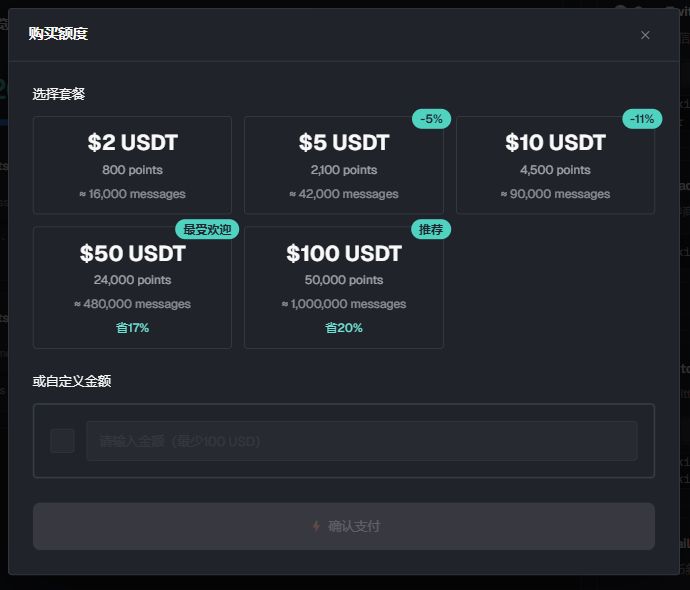
Purchase tiers and USDT prices shown are the offer at capture time. A one-time purchase adds PTS balance but does not change the membership level or unlock Max tools.
Billing and related pages
| Page | Available information |
|---|---|
| Billing | Review order type, amount, plan, status, and payment time. Download invoice and Export CSV are available when records exist. |
| Invitation and commission | Open Settings / Referrals to review invite codes, invite details, commission details, and withdrawal records. For a withdrawal, verify the displayed minimum, chain, fee, amount, and wallet. |
| Trial card | Enter a TC-prefixed code. Each account can activate one trial card. |
| Activate gift card | Enter a GC-prefixed code and complete the human verification. Credit is added immediately. A higher gift plan starts immediately and converts the remaining current-plan allowance to one-time PTS. |
| Buy gift card | Choose a quota or subscription card, plan or amount, billing period, and quantity. Complete the human verification and check the final payment amount. |
| My gift cards | Switch between Purchased and Activated, inspect card status, or open the purchase page. |