Open the calendar
On News, select US Stock Events in the footer. A narrow mobile screen may show only the calendar icon and count. The count covers upcoming events in the next seven days. The month and selected day’s schedule appear side by side on wide screens and stack on smaller screens.
The calendar shows available earnings, calls, dividends, and other company events, alongside macro releases such as CPI, PPI, payrolls, and central bank events. It serves a different purpose from the account PNL calendar.
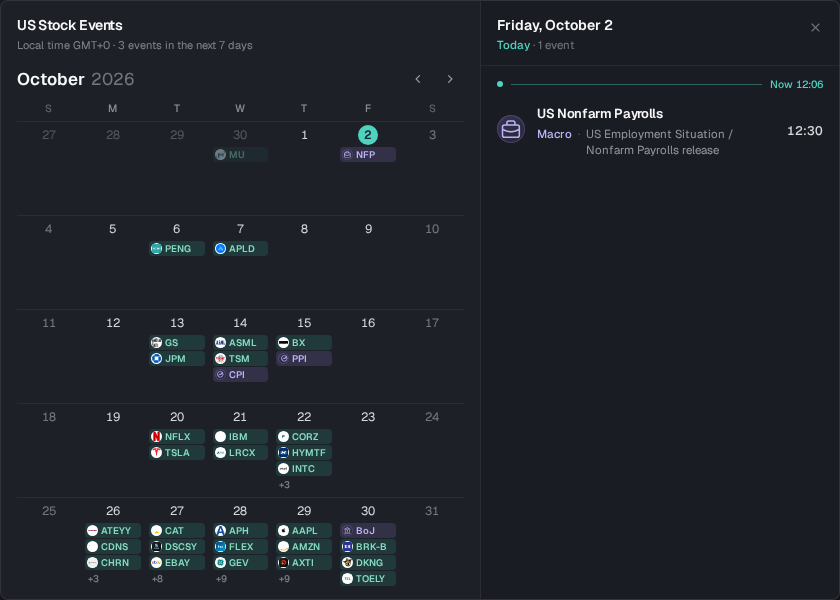
UI example captured on October 2, 2026 and cropped to the public calendar. This view uses English and GMT+0; counts, dates, and times depend on the data and browser time zone.
Choose a date
- 01
Read the upcoming schedule
The initial selection follows the next upcoming event day, or today if none is available. Check the local time zone and seven-day count at the top.
- 02
Select a day
Day cells show company logos, tickers, or short macro labels. Narrow cells use icons; +N indicates more events. Select the date to read its full schedule.
- 03
Change the month
Use the month controls within the current month and the range covered by available events. Today returns to the current date. A disabled control means no further month is available.
- 04
Use the keyboard
With a date focused, use arrow keys for dates and Page Up / Page Down for months. Escape, the close button, or a click outside closes the calendar.
Read times and event types
| Field | Meaning |
|---|---|
| Date and time | Timed events use the browser’s local time zone; hover for New York time. Dates may differ across zones. Date-only entries keep the source date and do not imply a midnight release. |
| Pre-market, regular, post-market | The US equity session for a company event. A session without a time is not an exact release time. |
| Time TBD | The source has not supplied a usable exact time; check again later. |
| Company and event | Logos and tickers identify the company; event types distinguish earnings, calls, dividends, and other activity. |
| Macro | Localized labels identify releases such as CPI, PPI, payrolls, and central bank events. |
| Now | A divider in today’s schedule helps distinguish past and upcoming events. |
Open a chart
Select a company event with an available market to close the calendar and switch the chart. Verify the ticker, venue, and pair. Current identifies the charted market. Macro events and companies without a supported market remain informational.
Enable Show US Stock Events in chart display options to see event markers for the current stock-related market. Hover or select a marker to open its card and page through grouped events. Calendar events and news markers have different inclusion rules; see chart news.
For research, give Agent the company, event date, and question. For example: “Verify the original earnings release and separate reported results, market expectations, and unconfirmed information.” Check page context before sending.
Missing events or unavailable charts
An empty day means no records were returned for that date. Choose another date or the next event day.
Use Retry after a loading error and check the network route.
An event without an available market cannot open a chart. Calendar coverage does not imply a listed contract.
Confirm release times and published results with the company or original publishing institution.